Why file search is secretly a big deal for coding agents
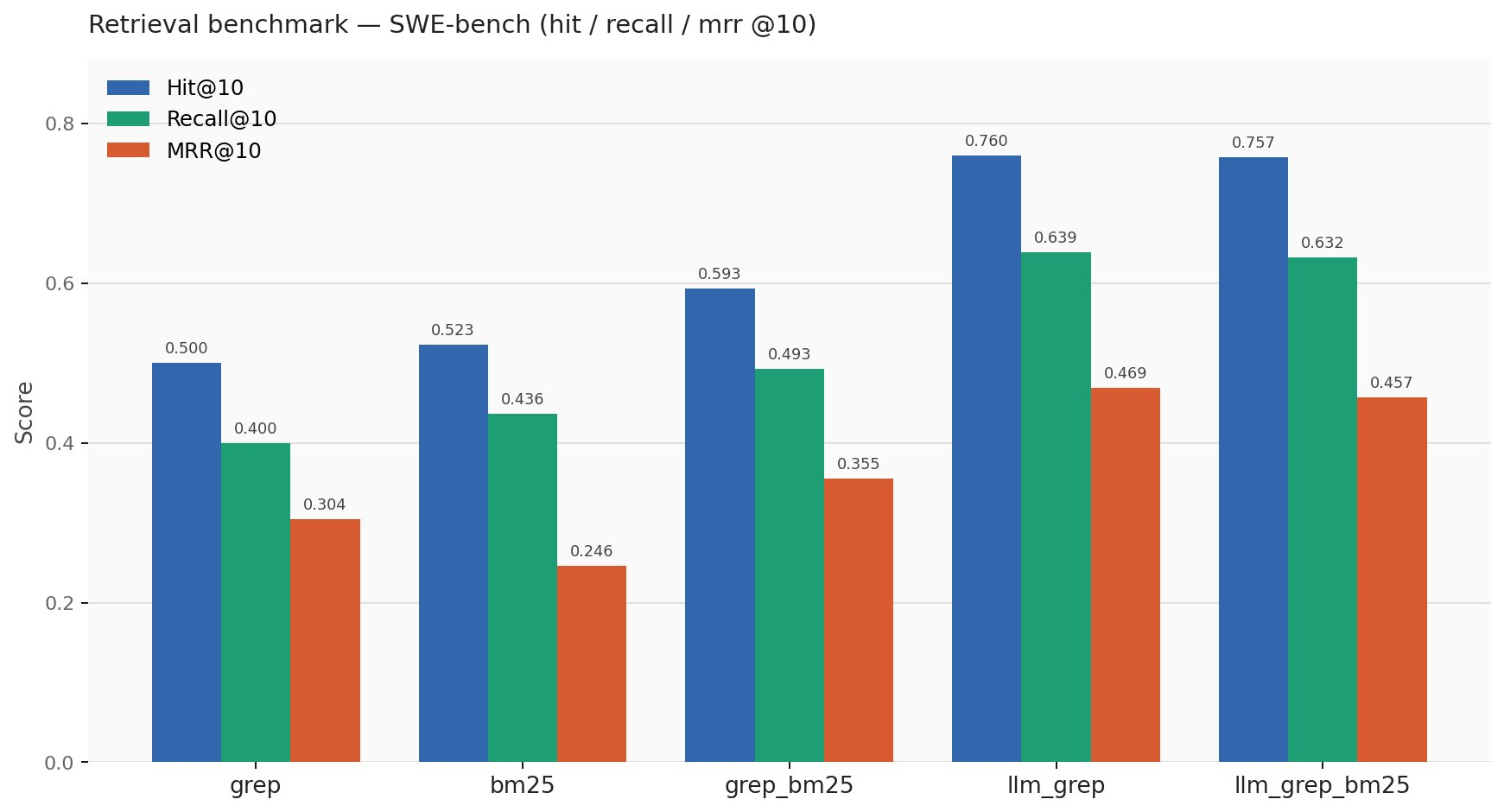
ok so i did some benchmarking on file retrieval for coding agents, and honestly the result is kinda funny. before a coding agent can fix a bug, it has to find the right file. sounds obvious, right? like yeah dude, of course. but once you actually test this part separately, you realize how much of the whole coding-agent thing depends on this boring first step.
imagine you tell an agent: “the timezone parser fails on ISO strings.” now the repo has 900 files. where should the agent look first? maybe it should open datetime_parser.py, timezone.py, test_datetime_parser.py, or utils/date.py. or maybe the real file is hiding somewhere annoying like src/core/serialization/time_helpers.py, because obviously software has to be like that.
if the agent opens the wrong files first, the rest of the reasoning starts from bad evidence. it might still be a good model, but now it is basically trying to debug the backend after you handed it the CSS folder. good luck bro.
so file retrieval here just means: given a bug report, return the files that are most likely relevant. that’s it. no patching, no code editing, no tests, no “agentic loop” drama. just: can we find the right files?
note: the code and evaluation scripts for this work are in the swe-bench-retrieval-eval repo.

the benchmark setup
i used SWE-bench multilingual. SWE-bench is a benchmark made from real software issues. the normal task is: given a GitHub issue and a repo, can the model fix the bug? i did not test the full bug-fixing loop here. i only tested the first search step.
SWE-bench multilingual has 300 tasks across 41 repos and around 11 languages/frameworks. this is nice because the repos are not all shaped the same way. some are Python-ish, some are JS-ish, some are Rust/Go/etc. the naming styles, folder structures, and bug reports are all different. that makes file search harder in a good way.
the rule was simple: input is the bug report, output is the top 10 files. no retries, no tool loop, no “wait let me inspect this file and search again.” when i say zero-shot, i just mean i did not train a retriever on this dataset. i gave the system the bug report and asked it to search. one attempt. no learning from benchmark examples.
this is intentionally strict. real coding agents search, read files, revise their search, edit, run tests, and then repeat. but i wanted to measure the first punch, not the whole fight. if the first search is better, the full agent loop should start from a better place too.
how do we judge if file search worked?
for each bug, we already know which files were actually involved in the solution. so after a retriever gives us 10 files, we can compare the guessed list with the real files.
the three scores i used were hit@10, recall@10, and mrr@10. these sound benchmark-y, so let’s make them normal. say the correct files are parser.py and test_parser.py. if the retriever returns 10 files and parser.py appears anywhere in that list, then hit@10 is counted as success. hit just asks: did we find at least one correct file?
recall@10 asks a slightly different thing: out of all the correct files, how many did we find? if there are two correct files and we found one, recall is half. if we found both, recall is full. this matters because some bugs need changes in more than one file.
mrr@10 asks how early the first correct file showed up. if parser.py is rank 1, that is great. if it is rank 9, technically we found it, but now it is buried under eight distractions. for coding agents, rank matters because the agent usually reads from the top. it does not have infinite context or infinite patience. neither do we, honestly.
so the simple version is: hit tells us whether we found the right file at all, recall tells us how many of the right files we found, and MRR tells us whether the right file was near the top.
method 1: dumb grep, but with some taste
the first method was basic grep. grep is just file search. you give it a word or phrase, it searches files for that word or phrase. it does not understand meaning. if you search for parse_datetime, it finds places where that exact text appears. it does not know what parsing or datetime means. grep is not thinking. grep is just looking.
so the first question is: what words should we search for? for the dumb baseline, i took the bug report and extracted words that were at least 3 characters long. then i removed boring words like the, and, is, for, and with. after that, i sorted the remaining words by length and took the top 12.
why length? because longer words in bug reports are often more specific. authenticationmiddleware is probably more useful than fix. shocking discovery, i know.
this is called a heuristic, which just means it is a hand-written rule. not learned. not fancy. just “this seems reasonable enough, let’s try it.” then i searched the repo with those keywords.
the scoring was simple. if a file contains a keyword, it gets points. but i also added a path bonus. if the keyword appears in the file path or filename, that file gets a big boost. for example, if the keyword is admin and the file is admin/options.py, that file should probably rank high. even if some random file mentions admin 20 times in comments, the path admin/options.py is a very strong clue.
code is not just text. folder names and file names carry meaning. filenames are basically tiny documentation files that we all pretend are not documentation.
method 2: bm25
the second method was BM25. BM25 is a classical search algorithm. if grep is asking “does this word appear here?”, BM25 is asking something closer to “how important is this word in this file compared to the whole repo?”
here’s the simple intuition. if a word appears in every file, it is probably not special. if a word appears in only a few files, it might be useful. but if a word appears 100 times in one giant file, we should not give that file infinite credit. after a few mentions, more mentions matter less.
so BM25 does two useful things. it handles file length, and it stops repeated words from dominating forever. file length matters because one match inside a small file is often more meaningful than one match inside a giant file. repetition matters because the 10th mention of a word should not be as valuable as the 1st or 2nd mention.
this is why BM25 is a better baseline than raw grep in many normal search systems. but code is weird. we’ll come back to that.
method 3: mixing grep and bm25
the third method was just mixing the ranked list from grep and the ranked list from BM25. this is called reciprocal rank fusion, but the idea is not scary.
imagine grep says parser.py is rank 2, and BM25 says parser.py is rank 5. the fusion method says: ok, both systems seem to like parser.py, so let’s boost it. files near the top get more points, files lower down get fewer points, and then we re-rank everything. that is basically it. no spiritual awakening here.
fusion can help when two systems are both kinda weak but weak in different ways. two confused people can occasionally triangulate the right answer. beautiful.
method 4: let the llm choose the grep terms
now comes the part where the dumb system became much less dumb.
the problem with heuristic grep is that it does not understand the bug report. it just grabs long words and hopes they are useful. very brave, very stupid.
so i used minimax-m2.5 to read the bug report and return 6-10 precise technical identifiers: function names, class names, method names, error message substrings, module names, config keys, and things like that. the prompt basically said: read the bug report, return only exact technical identifiers that are likely to appear in source files, do not include generic words, and output a JSON array.
the important thing is that the LLM is not retrieving the files directly. it is only deciding what to search for. that is the whole trick.
grep is already good at finding exact strings. it just needs good strings. so the division of labor becomes: the LLM understands the bug report and picks good search terms, then grep searches those exact terms very fast. this is much cleaner than asking the model to do everything.
after the LLM gives the keywords, i used grep -rli -F keyword repo/. quickly, -r means search folders recursively, -l means show only file names, -i means ignore case, and -F means fixed string search.
that -F flag is important. by default, grep treats the search term like a regex pattern. regex has special characters. for example, a dot means “match any character.” so if the LLM gives ast.literal_eval, regex-style grep may treat the dot as a wildcard. that can match weird things we did not ask for.
with -F, grep treats it as a normal string. so ast.literal_eval means exactly ast.literal_eval. no regex jazz. just the string. this sounds like a small detail, but retrieval pipelines are full of these tiny details. one flag can quietly make your results worse. unix is beautiful like that. tiny flags, large pain.
method 5: llm grep plus bm25
the last method was mixing LLM keyword grep with BM25. i wanted to check if BM25 still adds value after the LLM has already picked good identifiers.
this is worth testing because people love building kitchen-sink retrieval systems. add BM25, add embeddings, add rerankers, add graph search, add some path scoring, add three more things because why not. but retrieval is not pokemon. you do not need to collect every method. sometimes adding another signal helps. sometimes it just adds more ways to be wrong.
results
the scores were:
| backend | hit@10 | recall@10 | mrr@10 |
|---|---|---|---|
| grep | 0.500 | 0.400 | 0.304 |
| bm25 | 0.523 | 0.436 | 0.246 |
| grep_bm25 | 0.593 | 0.493 | 0.355 |
| llm_grep | 0.760 | 0.639 | 0.469 |
| llm_grep_bm25 | 0.757 | 0.632 | 0.457 |
the big result is that LLM keyword grep was the best. heuristic grep found at least one right file in the top 10 for about 50% of cases. LLM keyword grep did that for about 76% of cases. that is a 26 percentage point jump.
no embeddings. no vector database. no reranker. no fine-tuning. just better search terms and literal grep.
the funny part is that adding BM25 to LLM grep made things slightly worse. very classic machine learning moment: you add a reasonable component and the system says “nah”.
insight 1: bm25 found files, but not high enough
BM25 had slightly better hit@10 than dumb grep: 0.523 vs 0.500. so if you only look at hit rate, BM25 looks a little better.
but BM25 had much worse MRR: 0.246 vs 0.304. that means BM25 often found the correct file somewhere in the top 10, but it placed it lower. and this matters because rank 7 is technically “found”, but practically it is already fighting with six distractions.
why does this happen? because BM25 was built for text search. code search is similar, but not the same. in normal documents, a rare word is often meaningful. in code, a rare token might be a real function name, or it might be some random config constant, generated symbol, test fixture, or unrelated identifier.
so rarity is not always relevance.
dumb grep, weirdly enough, did better at ranking sometimes because longer bug-report words often matched specific identifiers. dumb but pointed can beat smart but diffuse sometimes.
insight 2: fusion helped weak grep, but hurt strong grep
when i fused dumb grep with BM25, performance improved from 0.500 hit@10 to 0.593 hit@10. that makes sense. both systems were weak in different ways. fusion helped them cover each other’s mistakes. mediocre + mediocre became less mediocre. beautiful.
but when i fused LLM grep with BM25, performance got slightly worse: 0.760 hit@10 went to 0.757, and MRR went from 0.469 to 0.457.
why? because LLM grep already had sharp clues. if the LLM says parse_datetime, CorsMiddleware, or ast.literal_eval, then grep can search those exact strings. that is a strong signal.
BM25 may then pull in files that talk about similar words but are not actually relevant. maybe a file talks about parsing, dates, errors, and strings, but it is not the file that needs changing. then fusion gives that noisy file some extra boost, and now the correct file gets pushed down.
so the lesson is: fusion helps when both signals are weak, but it can hurt when one signal is already precise.
this is especially true in multilingual repos. Python, Rust, Go, TypeScript, Java, etc. all have different token patterns. BM25’s word statistics get messy across that mixture.
insight 3: the search term matters more than the search engine
the biggest lesson for me was this: grep was not the problem. bad search terms were the problem.
heuristic grep searched for words chosen by a dumb rule. LLM grep searched for identifiers chosen by a model that understood the bug report. same tool, better query, completely different result.
this is such a useful pattern for agents. the tool does not always need to be intelligent if the model can use the tool intelligently. grep is a simple tool. but if the model chooses the right identifier, grep becomes very strong.
that is why the LLM keyword approach is interesting. it does not replace grep. it makes grep more useful.
what this says about coding agents

real coding agents probably already do some version of this, but in a loop. they search, read files, notice something, search again, inspect another file, revise their plan, and then edit. that loop matters. but the first retrieval still matters because it decides where the agent starts.
in this benchmark, LLM grep got 76% hit@10 in a purely single-shot setup. no retries. no file inspection. no follow-up search. no agentic redemption arc.
so if one-shot retrieval improves this much, it should probably help even more inside a proper agent loop.
the practical takeaway is simple: better first search means better starting context, and better starting context usually means better agent behavior. if the first set of files is better, the agent wastes less context, reads fewer irrelevant files, and has a better chance of touching the right code.
final takeaway
- the clean result is that reasoning-driven keyword selection beat heuristic keyword extraction and BM25-style lexical retrieval in this setup.
- BM25 was not useless. it helped when the base signal was weak. but when the LLM already picked precise identifiers, BM25 became extra noise.
- so the main lesson is: for coding-agent file retrieval, what you search for matters more than having a fancy search backend.
- the winning system was almost embarrassingly simple: read bug report, extract exact identifiers, grep literally, rank with path bonus.
- no vector database. no embeddings. no reranker. no fine-tuning. no 17-layer architecture diagram with arrows going everywhere.
just better search terms.